PokerCoaching Preflop Charts Review (2026)
The free charts cover far more than opening hands. The harder question is whether a chart library, a $999 course membership, or a focused trainer matches the way you actually study.
Quick Answer
PokerCoaching preflop charts are a strong free reference for cash, tournament, and heads-up players. They cover raise-first-in, facing-raise, and 3-bet situations across several stack depths. PokerCoaching is worth paying for when you also want structured courses, quizzes, live coaching, and broader poker study. Players who mainly need to turn ranges into automatic decisions may prefer a dedicated mobile trainer.
What does PokerCoaching include for preflop study?
PokerCoaching combines free chart downloads with a larger teaching platform. Its official preflop chart page says the ranges cover raise first in (RFI), 3-bet, and 4-bet situations. The library separates tournament, cash-game, and heads-up charts and offers multiple stack depths.
| Study need | PokerCoaching option | Access | Best use |
|---|---|---|---|
| Basic range reference | GTO and exploitative chart downloads | Free after signup | Review before or after a session |
| Guided learning | Courses, quizzes, classes, live coaching | Premium | Broad poker curriculum |
| Custom solver work | PeakGTO | Separate or bundled | Inspect and solve specific spots |
| Focused range drilling | Preflop Wizard charts and quizzes | Free app download | Repeated phone-native practice |
Access and prices were checked on September 21, 2026. Product terms can change.
Are PokerCoaching preflop charts actually free?
Yes. PokerCoaching offers free GTO and exploitative charts in exchange for an email signup. The downloadable material gives players a sound baseline without requiring the Premium plan. An older public library also lists free 100bb exploitative charts and paid-access GTO charts for 6-max cash, 4-max, heads-up, and tournament stacks from 15bb to 75bb.
Free does not mean universal. A chart is built from assumptions about table size, effective stack, ante, raise size, and opponent action. A 100bb 9-handed exploitative chart cannot answer a 25bb 6-max tournament spot. Before copying a colored cell, check that every label matches your hand.
How much does PokerCoaching cost in 2026?
PokerCoaching’s official pricing page listed Premium at $999 per year when checked on September 21, 2026. That plan includes courses, series, lessons, interactive quizzes, live webinars, hand reviews, and study plans. The page described the annual price as $83 per month when divided across the year.
PeakGTO was listed separately at $599 per year, or $50 per month when billed annually. The combined PokerCoaching and PeakGTO bundle was $1,299 per year. Those are meaningful purchases, so judge them against the entire curriculum rather than the free chart PDF alone.
A player studying tournaments, postflop play, hand reviews, and live classes can use more of the Premium membership. A cash player trying to stop folding the big blind too often may not need that breadth yet. Start with the free charts, write down recurring mistakes for two weeks, and pay only when the missing tool is clear.
Can you learn ranges from charts alone?
Charts can define a baseline, but recognition under pressure requires recall. That problem appears repeatedly in player discussions. In an r/poker thread about memorizing preflop charts, players recommended learning broad heuristics, focusing on boundaries, and reviewing the chart after the hand instead of trying to memorize every square at once.
Another r/Poker_Theory discussion specifically references Jonathan Little’s downloadable charts while asking whether they fit a 10NL game. That question exposes the useful disagreement. One group wants a stable default. Another worries that a general chart ignores rake, population tendencies, and the exact game being played.
Both positions are reasonable. Use a chart as the default you can explain. Then adjust when you have reliable evidence that a pool opens too tightly, calls 3-bets too wide, or uses a different size than the chart assumes. Blindly following a chart is not GTO study. Neither is abandoning a sound baseline because one table feels loose.
YOUR TURN / A TOUGH PREFLOP SPOT
Would you play this hand?
A suited ace. An early-position raise. An easy spot to second-guess yourself.
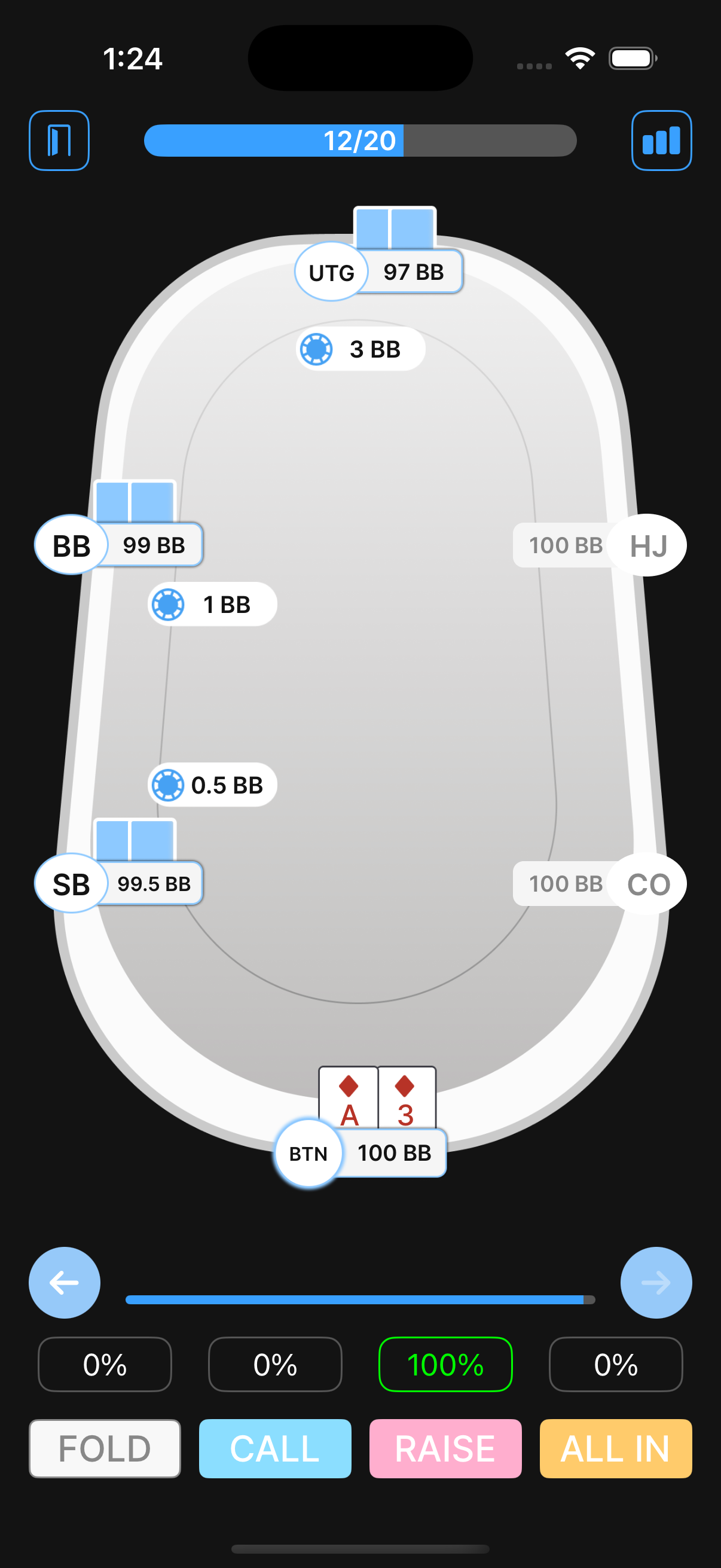
A♦ 3♦. What’s your move?
UTG opens to 3bb. The hijack and cutoff fold. You’re on the button with A♦3♦, and both blinds are still behind you.
Choose your action to reveal the trainer’s answer.
Stop guessing. Start practicing.
Study ranges, test your decisions and review your progress in Preflop Wizard.


How should you study PokerCoaching charts?
Study one decision family at a time. Mixing every stack depth and action creates noise. The following three-hand drill turns a static chart into decisions you can recall at the table.
Hand 1: K9s unopened on the button
Set the game to 100bb 6-max cash and ask whether K9s is inside the button opening range. Then move the same hand to the hijack. The contrast teaches how position changes the boundary instead of asking you to memorize K9s in isolation.
Hand 2: A5s facing a cutoff raise
Keep your seat, stack, and opener fixed. Compare A5s with A9o. The suited wheel ace may appear in an aggressive response because it blocks strong aces and retains playable equity, while a stronger-looking offsuit ace can create dominated postflop outcomes.
Hand 3: 77 with 20bb in a tournament
Run the spot unopened, then facing an early-position raise. Do not carry the first answer into the second decision. Action before you, antes, table size, and effective stack all change the range. Name those inputs before revealing the chart.
Repeat missed hands until you can state the reason for the boundary. Our guide to practicing poker ranges provides a complete routine, while the preflop charts guide explains how to read mixed actions and position labels.
PokerCoaching vs Preflop Wizard: which is better for drills?
PokerCoaching is the broader school. Preflop Wizard is the narrower practice tool. PokerCoaching makes more sense when you want named coaches, courses, live sessions, postflop instruction, quizzes, and solver access in one study system. Preflop Wizard makes more sense when the job is opening, calling, 3-betting, and defending ranges on a phone.
Choose PokerCoaching when
- You want a broad poker curriculum
- You attend live coaching sessions
- You study postflop and preflop together
- You will use PeakGTO solver work
- You value coach-led hand reviews
Choose Preflop Wizard when
- Your current leak is preflop
- You learn through short decision drills
- You want native iOS and Android access
- You need quick chart lookup and practice
- You do not need a full course library
This is a scope decision, not a claim that one platform replaces the other. Preflop Wizard does not teach postflop streets or offer a roster of live coaches. PokerCoaching does not have the same single-purpose preflop workflow. Compare more options in our guide to the best poker training apps.
Is PokerCoaching worth it?
PokerCoaching is worth considering for a player who will use its full learning system. The current Premium plan bundles courses, interactive quizzes, live coaching, hand reviews, and study plans. Its free preflop charts are useful even if you never subscribe.
It is harder to justify a $999 annual plan only to obtain preflop ranges. Download the charts first. If you repeatedly need explanations, live feedback, and a broader curriculum, test the paid offer. If your main problem is recalling ranges in real time, build a daily drill habit before buying more content.
PokerCoaching preflop charts FAQ
Are PokerCoaching preflop charts free?
Yes. PokerCoaching offers free downloadable GTO and exploitative preflop charts after email signup. Its public chart page covers tournament and cash-game ranges, while additional training, quizzes, courses, and coaching sit inside paid products.
What do PokerCoaching preflop charts include?
PokerCoaching publishes raise-first-in, facing-a-raise, and raise-versus-3-bet charts. Its library includes cash, tournament, and heads-up formats at multiple stack depths, although access levels vary across the free and paid chart collections.
How much does PokerCoaching cost?
When checked on September 21, 2026, PokerCoaching listed Premium at $999 per year, PeakGTO at $599 per year, and the combined bundle at $1,299 per year. Prices and promotions can change, so confirm the official pricing page before buying.
Is PokerCoaching good for learning preflop ranges?
PokerCoaching is a good fit if you want preflop charts inside a broad course, quiz, webinar, and solver ecosystem. If your only goal is memorizing preflop decisions through short mobile drills, a dedicated range trainer may provide a simpler study loop.
Should beginners memorize preflop charts?
Beginners should learn the shape and boundaries of a few common ranges before trying to memorize every cell. Start with raise-first-in decisions by position, drill the hands near each boundary, and review mistakes after playing instead of consulting charts during a hand.
Turn the chart into a table decision
Practice opening, calling, 3-betting, and blind-defense spots with immediate feedback. Start free on iOS or Android.